*achtung! Before proceeding, please consider the possibility of eminent hard drive failure and back-up all your important data immediately. This is your third final warning in this particular post. As a side *achtung! I also promise to not get emotional.
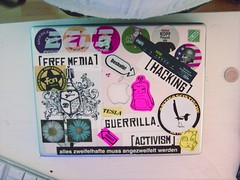
A couple days ago I was waking up in the kitchen (I “wake up” by drinking warm, caffeinated beverages. No, flat room temp. coke is not considered a warm, caffeinated beverage and no, I did not literally wake up off my kitchen floor. I have the floor in my bedroom for doing that), and had a black tea and a bowl of lemon yogurt for that meal between lunch and dinner, dunch. As I was chatting to smarch on skype, I experienced an abnormally long wait for what is widely known as the spinning beach ball of death. Using macs and computers in general for a number of years, I decided to execute the best know fix for such a predicament; I pressed and held the power button to initialize a hard reboot.
Curious about what was going on behind the apple aesthetic facade, I decided to boot the machine in verbose mode (command-v) to watch the start up echo and analyze why my computer was hanging. While it was initializing the swap partition, I was presented with the first clue:
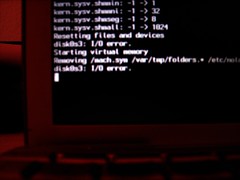
Disk I/O error. Hummm… ok. I let it run a little longer to see if any other errors came up in the boot process. Usually a memory error on a mac chimes a drum roll, or something like that at the boot rom faze. i did not hear this so I was fairly certain it wasn’t my ram gone rotten. After listing its’ failed attempts to create a swap partition, I was faced with this error.
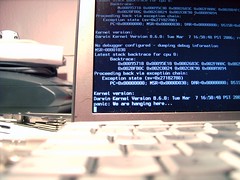
Fairly straight forward so far. I suspected that it was a hard drive failure. I placed my ear up to where the hard drive would be on a 12-inch powerbook; on the lower left side of the notebook, under the left side of hand-rest, beside the battery, and listened. Fulfilling my fears, I heard a consistent, rhythmic ticking sound emanating deep from within the powerbook’s 1-inch body, which incidentaly reminds me of a techno party i went to in berlin. Anyone who has had any experience with rhythmic ticking hard drive sounds would know that this symptom was, colloquially put, totally fcuked up.
Ok. At this point I started to freak out a little, but only in the inside ;). It was 17:30 so I still had some time to run to conrad, grab the proper screw drivers (a torx T6 and a philips #0 40mm) and a fresh hard drive, stop off at the atelier to grab a couple external 2.5 inch hard drive enclosures (6 pin firewire and a 4 pin USB2 one) and rushed back home to be with my ticking sweetheart.
Making a worktable out of a couple a-frame stands and an old door that uli picked up somewhere outside, I set up a quick and dirty workbench in our living room, looked up a howto on the internet, put some rubber gloves on (oh wait, techno party again) and proceeded to jump into the machine.
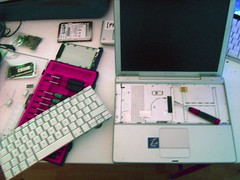
The procedure was a lengthy and trying process. I had to remove the battery, memory, keyboard, most of the housing and a sh!t load of tiny screws of various lengths and diameter.
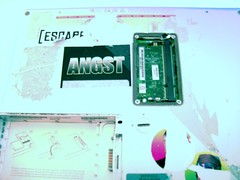
After some digging I finally got to the heart of the problem, a 5 year old 30gb Toshiba hard drive. “You little bastard” I called it, as I plucked it from its cozy place. I wonder if heat affected its lifespan. There were quite a few layers of sticker insulating the area of the powerbook that the hard drive was contained in… hummmm… mental note…
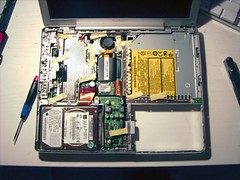
Before installing the new hard drive I picked up earlier that day (an 80gb, 8mb 4200RPM fujitsu, for long battery life) I attempted a series of recovery methods to try to salvage any data I could from the hard drive.
I tried to connect the hard drive in question directly to a parallel ATA port on OS X, windows XP and debian GNU|linux machines. I tried again in firewire and usb hard drive enclosures, as target mode for os x, mounting in linux, even installed macdrive on my XP machine but to no avail. Tried a knoppix disk too. I tried to shake it a little. even tried sweet-talking. Nothing. i wasn’t able to initialize the drive what-so-ever. I guess the main problem was simply one of mechanical failure.
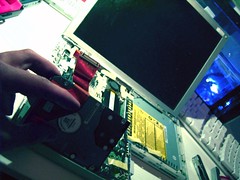
After putting the faulty hard drive in the freezer (some long lost, hard drive recovery mojo that smarch bestowed upon me, most likely found on some ancient tomb of a forum, babelfished from some eastern European server), I installed the new hard drive and screwed the poor thing back together with all the care a lover would screw that special someone, although it really doesn’t fit the same way like it did the first time.
Barring some magnetic storage forensics miracle (and boat loads of money) here is a list of the data I lost off the top of my head, forever.
Things lost:
80 or so high resolution photocollages / any photograph I took in the last five months, including new year / 4000+ emails / a whole bunch of new contacts / 2 new proposals for exhibitions in Germany and the Netherlands / all the music I ever made on gameboy and garageband, including all samples, recordings and loops / my CV / some freelance work for a fashion company masterpiece cleaners is working on / a whole buncha other stuff that will be sorely missed.
Things gained:
an ever increasing loss of faith in salvation through science and technology
*This list is more for my personal mourning, but i also hope it scares you into backing up all your stuff right now. That’s right. Stop reading and go back-up. Now.
let this be a lesson to me (again!). back-up, b a c k – u p , !!!BACK-UP!!!! Hope you get the message too. Please back-up regularly (as in, more then every half year) and safely (as in, mirror your hard drive and put it at your mama’s house, or wherever it would be safe from your own house burning). 30 gb of data is really a lot of stuff.
good luck!



 villainous.biz
